The AI Exchange December Session: A Deep Dive into Canvas and AI Tools

The AI Exchange December Session: A Deep Dive into Canvas and AI Tools

This 2025-2026 Academic Year the OTL is hosting monthly events called the AI Exchange where we collaborate with offices across the DU campus to learn more about artificial intelligence (AI) in teaching and learning contexts. Sessions vary across the purpose and scope – some may center skill building and others may offer a show-and-tell approach to learning more about how AI is integrated to support student learning experiences and outcomes.

Terri Johnson, OTL’s Senior Faculty Developer, collaborated with Chelsie Ruge and Jared Fox from the College of Professional Studies for the December session of the AI Exchange: Learn & Play with the Canvas AI Features. We demonstrated the latest AI technology integrated with Canvas and then spent time trying out these exciting tools together!
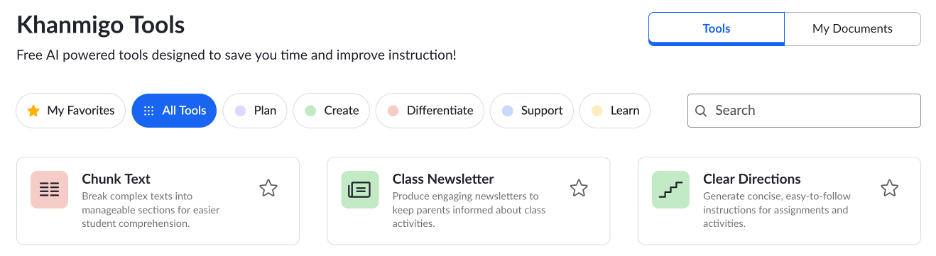
Enhancing Instruction with Khanmigo Teacher Tools

Screenshot of Khanmigo Tools within Canvas

We kicked off the session by showcasing the Khanmigo Teacher Tools that support teaching and course design, now integrated with Canvas. These AI-powered tools help in a variety of ways:

  • Plan – Lesson planning and curriculum development
  • Create – Generate assessments and learning materials
  • Differentiate – Personalize learning for diverse needs
  • Support – ​Provide additional explanations and resources
  • Learn – Enhance your own subject knowledge

Learn more: Khanmigo Teacher Tools Knowledge Base article

Unlocking Insights with Canvas Discussion Summaries

Then we focused on Canvas Discussion Summaries, a built-in Canvas tool to help better understand student engagement. These summaries allow instructors to adapt their teaching in real-time and provide targeted, meaningful feedback. The Discussion Summary Tool can help:

  • Identify key themes/patterns​
  • Recognize gaps or misconceptions​
  • Understand interests/backgrounds and personalize the course experience​
  • Highlight opportunities to connect ideas across students​
  • Plan follow-up communication

Learn more: Canvas Discussion Summaries Knowledge Base article

Navigating Your Canvas Course With IgniteAI Search

We also explored IgniteAI Search, a tool that allows users (both instructors and students) to search across every item within a Canvas course. This tool can be immensely helpful, ensuring essential content is always just a few clicks away:

  • Quickly find relevant content across your course
  • Save time on course preparation and updates

Learn more: Canvas IgniteAI Search Knowledge Base article

Next Steps

These tools have serious potential to save us time and enhance the learning experience. We encourage all interested instructors to dive into these tools and try them out in your courses.

Visit our OTL Crimson Connect Events Page to find and register for our upcoming AI Exchange sessions and other OTL Events!